Thursday, August 14, 2014

Make sure your mobile devices can take life’s knocks in style

by Heinrich Pretorius, Targus Product Specialist at DCC

The mobile workforce has firmly entrenched itself globally and locally, the variety of devices has grown, it has also become increasingly common for the same user to have multiple devices. Most commonly, these devices include a notebook and a tablet. While portability is the biggest advantage of these devices, this same feature can also be their downfall – portable devices are more likely to be dropped, bumped or otherwise damaged. Protecting this expensive equipment adequately is therefore essential, to ensure that mobile devices can take the knocks of an on-the-go lifestyle.

The rise of the mobile warrior has been fuelled by increasing portability of computing devices, including notebooks and tablets. With tablets, the screen is often the most vulnerable piece of hardware – to which anyone who has ever dropped one of these devices will attest. Cracked glass makes the entire device practically impossible to use, and tablets often cannot be repaired but must be replaced in their entirety, which is an expensive exercise. Notebooks, while they are slightly more robust, are also prone to damage from knocks and bumps, primarily with regard to the hard drive. Devices with Solid State Drives (SSDs) are less vulnerable, but the majority of notebooks still contain traditional spinning platter Hard Disk Drives (HDDs). If these are dropped or bumped excessively they can become corrupt or fail completely, causing data loss that can be detrimental. While smartphones too have evolved as part of this movement, the size of a phone makes it easier to put away safely in a pocket or a handbag. When it comes to protecting notebooks and tablets, however, specialised solutions are necessary.

Quality should be the overriding feature to look for in any physical protection for mobile devices, and in many instances the old adage ‘you get what you pay for’ rings true. Tablets and notebooks are expensive, so buying the cheapest case to protect them is counterintuitive and could cause problems further down the line. Quality can be judged by the look and feel of the materials, the zips, the handles, and any fixtures and fastenings, as well as the padding that holds devices in place. In addition, the warranty is a good indication of quality. A manufacturer that is willing to provide a lifetime warranty against defective workmanship is confident that they are offering the very best possible quality. After all, every time something is returned under warranty, it costs the manufacturer money and profit.

While quality is very important, in today’s world, choice is also critical – in terms of style, colour and functionality. For corporate users, a leather attaché case with pockets for business cards, documents, phones, tablets and notebooks might be the most appropriate option. For a student, photographer or someone in a less formal environment, a backpack would be better suited. There are even cases for ladies that resemble a designer handbag, allowing the fairer sex to carry their devices in style and sophistication without compromising on quality. Whatever the look of the case or cover, however, their ability to physically protect devices is essential – they need to be durable, water resistant and able to handle the rigours of continuous use.

Mobility is here to stay, and as the number of devices we carry increase and their value in our lives skyrocket, protecting our equipment is more important than ever. From students to corporate executives, men and women, fashionistas or the more traditionally inclined, there is something out there to suit everyone’s style. Just be sure that the quality lives up to the essential nature of the job – a lifetime warranty is the best guarantee that covers sleeves and cases, ensuring they will not let you down.

Wednesday, August 13, 2014

Choosing the right Microsoft Office product to suit your needs

By Ruben Naicker, Microsoft Product Specialist at Drive Control Corporation


Microsoft Office is the most widely used productivity software packages in the world, and is available in several different versions for different users. For consumers, however, these different suites can cause confusion. Do you need Home and Student, Home and Business or the Professional edition? Or would Office 365 suit your needs better? Not having a clear understanding of the differences between these suites and what each of them offers can lead to an incorrect purchase. This creates unnecessary frustration and expense, as users may need to purchase additional products to get the solution they need. Choosing the correct Microsoft Office solution will ensure you get the appropriate solution for your needs, with the best combination of value for money and functionality.

How many users and devices do you need a solution for?
This is the first question users should answer before purchasing an Office software package, as the various solutions cater to different numbers of users and devices. Office Home and Student and Professional editions are single device licenses, meaning that each package can only be installed on a single computer. For multiple devices, one license will have to be purchased for each device. Office Home and Business edition offers a license for one user for one device. Office 365 Personal offers a single user license that is valid for two devices - one PC or Mac and one tablet, including iPad. For a single user with more than one device, this is the most cost effective solution. Office 365 Home is a household license valid for five PC or Mac devices as well as up to five tablets, while Office 365 University is aimed at students, valid for two devices, be it a combination of either PCs, Macs or tablets.

What applications do you need?
The different versions of Microsoft Office also come with different combinations of applications. Office Home and Student includes Word, Excel, PowerPoint and OneNote, but does not include Outlook. Users who require Outlook in addition to the core Microsoft applications will need to purchase Office Home and Business. Office Professional includes all of these applications as well as Publisher, which can be used to design and create newsletters and brochures, and Access, allowing users to create desktop databases. The different packages of Office 365 include all of the applications of Office Professional, with the exception of Publisher and Access, which are not available when Office 365 is installed on Apple devices. Personal and Home versions are aimed at home users, while University is only available for students.

What operating system am I running?
Microsoft Office Home and Student, Home and Business and Professional editions are only compatible with Windows 7 and Windows 8. If you are running a Mac device, you will need to purchase Office for Mac, which is available in Home and Student and Home and Business editions. Alternatively, Mac users can make use of Office 365 Home, which is compatible with up to five devices on both Windows and Mac Operating Systems (OS) plus up to five tablets, including iPad.

To sum it up
Microsoft Office Home and Student is best suited for users who want the basic Office suite on a single PC for the family. Home and Business is best suited for users who want the basic Office suite, plus Outlook. These products are also available in Office for Mac versions for Apple users. Microsoft Office Professional is for those who need the basic Office suite, Outlook, Access and Publisher giving the ability to create marketing material on a single PC.

Microsoft Office 365 for consumers is available as follows: Personal, Home and University. Office 365 Personal is available for a single user on one PC or Mac as well as one tablet. Office 365 Home is best for families that want all Office functionality on up to five PCs or Mac and five tablets, plus easy access on smartphones. Both are available with a one-year license, either as a single payment or a monthly fee. Office 365 University is best for students who want Office on up to two devices – PCs, Macs or tablets. It is available as a four-year subscription at a special discounted rate, either up front or per month. All of the consumer versions of Office 365 now also include 60 Skype world minutes per month, which enable users to call landlines in 48 countries. All Office 365 solutions also offer 1 Terabyte (TB) of OneDrive cloud storage, which can be accessed on all connected devices as well as Android smartphones and iPhones, so important documents and applications are not lost even if the physical device is damaged, lost or stolen.

Understanding your needs, and the features available on each version of Microsoft Office can help to alleviate the confusion around purchasing this vital software tool. By answering these three questions and matching your needs to the Office product best suited to your situation will ensure that users get exactly what they need without frustration or added expense.

Friday, June 20, 2014

The New Face of Computing


Jimmy is a humanoid robot based on Intel Core i5 technology that walks, talks, makes hand gestures, uses social media channels and more. It is part of the 21st Century Robot Project that provides a forum for makers worldwide to collaborate and build affordable, personalized robots using open-source design files and available apps. Combined with the growing maker culture, technologies such as Intel Galileo, Intel Edison, 3-D printing and open-source app development are making it easier for individuals to create inventions such as Jimmy. It is feasible that within the next five years people may be able to build affordable custom robots based on Intel technology for less than $1,000. 

Intel is committed to lowering the barriers to entry for all innovators - whether it's a child, the hobbyist or a professional designer- who have great ideas but not deep experience with technology. Intel Labs is bringing Jimmy to life in collaboration with publisher MAKE, University of Southern California*, Olin College for Engineering*, maker space The Artisans Asylum* and Trossen Robotics.

Jimmy helps encourage people to think differently about what a computational device could look like in the future and to spark the imagination of inventors of any age to reimagine the ways in which people can design, create, enjoy and use new digital technologies. Powered by Intel, these new computing models - like robotics - may become mainstream consumer electronic devices that could act as social companions, organizers, educators and more. Imagine a robot that acts as a caretaker to senior citizens to remind them to take their medicine or is used in the classroom to augment the teacher to provide more individualized attention to students.

Monday, June 09, 2014

High speed mobile Wi-Fi – The Huawei E5372 LTE from DCC


Take advantage of LTE mobile broadband speeds and securely share your connection across a home, office or any other location with the Huawei E5372 LTE from distributor Drive Control Corporation (DCC). This mobile Wi-Fi hotspot boots up in just five seconds, enabling users to wirelessly connect up to 11 devices at a time and share high-speed Wi-Fi connectivity with download speeds of up to 150 Megabits per second (Mbps).

“Many users in South Africa do not have access to ADSL or fibre, and therefore turn to mobile broadband for Internet access such as 3G and more recently, LTE. With the growing availability of LTE, this is becoming an even more viable option. The Huawei E5372 LTE is the perfect device for turning mobile broadband into a Wi-Fi network for sharing in a small office or with friends and family at home, and even for taking your hotspot with you wherever you go. Simply boot up, enter the password and connect. The device can also be connected via USB to a computer, and supports Vodacom, MTN and Cell C networks,” says Fayaaz Seedat, Huawei Consumer Product Specialist at DCC. 

The E5372 features AC power as well as up to 10 hours of battery life on a full charge, making it ultra-portable for a wide range of applications. Two internal antenna interfaces enhance indoor Wi-Fi signal coverage, ideal for larger homes or offices. Unauthorised access is prevented by password protection to ensure security, and a MicroSD card slot enables you to store and share data through your Wi-Fi hotspot. The E5372 supports both Windows and Mac Operating Systems (OS), compatible with all versions of Windows from XP onward and with Mac OSX 10.5 and up.

The Huawei E5372 LTE will be available mid-June from resellers and leading retailers for a recommended retail price of R2 560.00 including VAT.

For more information, visit www.drivecon.net.

Tuesday, June 03, 2014

High performance NAS with personal cloud capability – WD’s My Cloud EX4 from DCC


Get ahead of your data storage needs with up to 16 Terabytes (TB) of Network Attached Storage (NAS) as well as personal cloud functionality with WD’s new  My Cloud EX4 from distributor Drive Control Corporation (DCC). The My Cloud EX4 is a high-performance, four-bay NAS for your home or small office, built from the ground up with the quality and reliability users have come to expect from WD. It offers a robust all-metal enclosure, multiple Redundant Array of Independent Disks (RAID) volumes, easy drive installation and a full suite of applications (apps) for the power and flexibility to expand your NAS features. In addition, the My Cloud EX4 gives users their own personal cloud, allowing you to take advantage of the benefits cloud has to offer without any of the hassles or drawbacks.

“The My Cloud EX4 delivers centralised NAS storage for your home or office, allowing you to keep all of your content safe in one place. However, the real innovation is the personal cloud functionality, which means you can access this content remotely using a variety of devices, by using the WD My Cloud mobile and desktop applications, no matter where you are in the world. Your own cloud means you are in control of your data and where it is stored, and if you need more space, you can simply add capacity to the device – up to 16TBs in total and no need for monthly fees to a cloud provider,” says Ruben Naicker, WD Product Specialist at DCC.

The My Cloud EX4 offers a number of configuration options to suit any requirements. A diskless enclosure allows users to easily install and hot swap to add up to four compatible drives and add capacity as needed. The solution is also available pre-populated with WD Red hard drives, which are purpose-built for 24x7 NAS environments for enhanced performance and reliability. Features include dual network and power supply, 512 Megabytes (MB) memory and a 2.0 Gigahertz (GHz) processor for superior performance.

To deliver enhanced data management, the My Cloud EX4 supports multiple RAID configurations, including RAID 1, 5, 10, as well as spanning and JBOD modes. Data protection options include remote backup to another My Cloud EX4, integrated cloud backup or local LAN/WAN backup. The device includes WD SmartWare Pro for PC users and Apple Time Machine for Mac to ensure optimal data protection.

The solution is designed to be easy to use and easy to manage, with a powerful dashboard and LCD display for continuous monitoring of drives, management of users and utilisation of energy saving features. The My Cloud EX4 enables users to stream videos and photos to connected TVs, media players, gaming consoles and more, and an integrated file server, FTP server, backup server and P2P torrent download server provide advanced servicing options. In addition, email and mobile alerts keep you informed on the status of your My Cloud EX4 at all times.

“The My Cloud EX4 also gives users access to a number of award-winning desktop and mobile apps. WD’s app allows you to upload, access and share your documents from anywhere and transfer files from your public cloud service to the My Cloud EX4 directly from the mobile app. Other industry-leading apps include aMule, Icecast, Joomla! phpBB, phpMyAdmin and SqueezeCenter, which allow you to customise your NAS to meet your unique requirements,” says Naicker.

Expanding capacity is easy - simply attach a compatible USB hard drive directly to one of the two USB 3.0 expansion ports on the My Cloud EX4 and instantly expand your storage. Users can also save power consumption with integrated energy-saving features such as disk spin-down and scheduled power on/off. A full suite of advanced features include iSCSI target, full-featured FTP services, link aggregation and failover support, jumbo frame support, iPv6 ready, UPS support (USB and network), real time resource monitor, volume encryption with boot-up password, SNMP and virtual volumes.

“This product is a unique offering on the market, with a host of powerful yet easy to use features. By adding this enclosure to our portfolio we are enabling resellers to target both the SME market and prosumers with a comprehensive solution that provides capacity, redundancy and high performance NAS, critical in today’s data-driven world, along with a host of value-added features,” Naicker concludes.

The WD My Cloud EX4 is available immediately from selected resellers. For the latest list of compatible drives, visitwd.com/mycloudex4.

For more information visit www.drivecon.net.

Wednesday, May 14, 2014

DCC’s new UltiMate – affordable tablets for everyone

Tablets are increasingly becoming part of our everyday lives, and are often used by every member of the family. However, the price point of many tablet devices has been a significant barrier to entry – until now. Distributor Drive Control Corporation (DCC) introduces the UltiMate – a range of performance tablets with all of the features you need, at a price that won’t break the bank. Available in both 7-inch and 10-inch models, the DCC UltiMate is the ‘ultimate’ in affordable tablet computing.

“Tablets are everywhere – there’s no getting away from how useful they are for performing everyday online tasks on the move, for socialising, and even for playing games. From parents who need portability and easy access to online content and social media, to children who require tablets for classes and schoolwork, the need is growing. However, many users are unable to afford a branded device. DCC’s UltiMate is the perfect affordable solution, with the right balance of excellent pricing, solid performance and a full array of features,” says Bruce Byrne, Visual Communications Specialist at DCC.

Featuring Android’s Jelly Bean Operating System (OS), the UltiMate gives users access to thousands of applications (apps) on the Google Play store, from games to online newspapers and magazines, as well as eLearning content and eBooks. A 1.3GHz Quad Core processor and 8 Gigabyte (GB) Random Access Memory (RAM) offer enough power and performance for some serious multitasking, while a USB port, Bluetooth, Wi-Fi and 3G with dual SIM slots offer a range of connectivity options.

The 1GB of on-board memory can be upgraded with up to 32GB MicroSD expandable storage for storing photos, movies, music and more, and an HDMI port enables the UltiMate to be connected to High Definition (HD) televisions and monitors for content sharing. HD IPS panel screens on both the 7-inch and 10-inch models offer crystal clear viewing.  Built-in speakers and a headphone jack let you enjoy quality sound out loud or in private, perfect for gaming and content viewing at home or on the go. Topping off these impressive features, the UltiMate includes a 3 Megapixel front facing camera for video calling, and a 5 Megapixel rear camera for capturing memories on the move.

“This tablet has everything users need, and can even be used as a phone or a GPS thanks to the ability to install not one, but two SIM cards for voice and data bundles. It is a must have for schools and school children, as reference books can now often be downloaded and interactive learning is becoming increasingly popular. It is also ideal for Point Of Sale (POS) interactive advertising, promotions, sales staff and anyone else who wants the features of a tablet without the expensive price tag,” Byrne concludes.

DCC’s UltiMate tablets feature a one-year warranty. They will be available in March 2014 from resellers and leading retailers. The 7-inch model has a recommended retail price of R1 400.00 including VAT while the 10-inch model retails for a recommended price of R2 500.00 including VAT.

For more information, visit www.drivecon.net.

Tuesday, April 15, 2014

DCC announces Huawei’s Wingle - extending 3G coverage to additional users


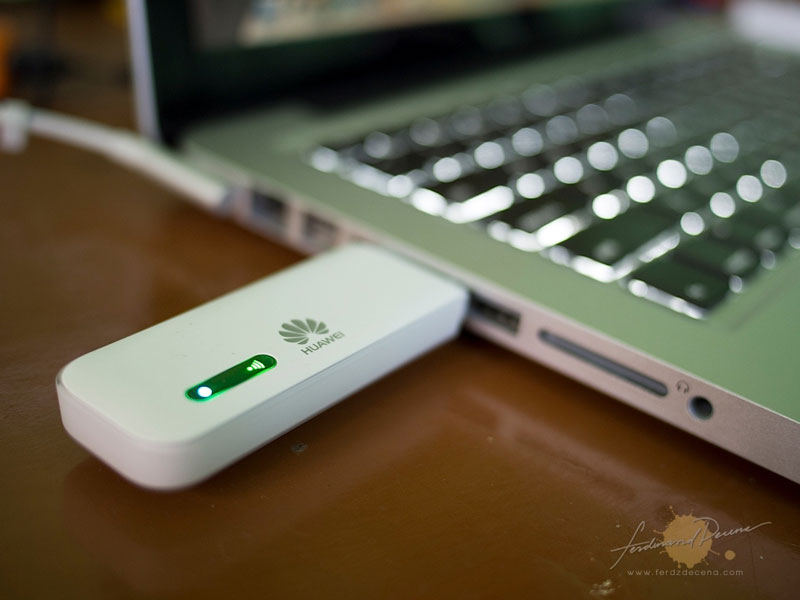
With the mobile workforce on the rise and individuals always requiring Internet connectivity, access is an essential in everyday life. The Huawei Wingle, available from distributor Drive Control Corporation (DCC), addresses this requirement with a convenient 3G USB connectivity device that allows up to 10 additional users to make use of the 3G connection via WiFi.

“Everyone requires a combination of connectivity, mobility and Internet sharing.  However, many devices such as USB dongles on the market today only offer connectivity for a single user. The Huawei Wingle allows users to easily share 3G Internet connectivity using only one USB connectivity device, making this ideal for people without ADSL or with budget constraints,” says Raul Del Fabbro, Enterprise Solutions Manager at DCC.

Catering for small businesses and even households that require shared Internet connectivity, the Huawei Wingle supports full 3G / HSDPA with transfer rates of up to 21 Megabytes per second (MB/s) for downlinks and uplink speeds of up to 5.76 MB/s. This ensures that users are able to work on the move without compromising fast connectivity speeds.

The Huawei Wingle is simple to use and requires one user to insert the USB device into their laptop or PC. This connection is then shared with up to 10 users – wirelessly.  This is ideal for small businesses with two to ten personnel or families that don’t have ADSL. The Huawei Wingle allows these users to share connectivity easily and cost effectively without having to purchase additional USB dongles for each person.

The Huawei Wingle is automatically charged when plugged into a laptop or PC and can also be charged with the provided power adapter or by making us of a USB car charging kit. This allows users to plug the Huawei Wingle into a charging kit and make use of the 3G connectivity while sitting in a car. Supporting Windows, MAC and Linux Operating Systems (OS), the Wingle can be used on a variety of PCs and notebooks.

“The combination of a 3G USB that allows users to connect through WiFi is the ideal solution for shared connectivity across multiple devices,” concludes Del Fabbro.

The Huawei Wingle (Model Number: E8231) is available from DCC and selected retail outlets immediately for a Recommended Retail Price (RRP) of R900.00 inclusive of VAT.

For more information, visit www.drivecon.net